Content: Recipes
Adding Recipes
Adding Recipes
As always click on the + icon in the content panel.
Then select Recipe from the list and click next.
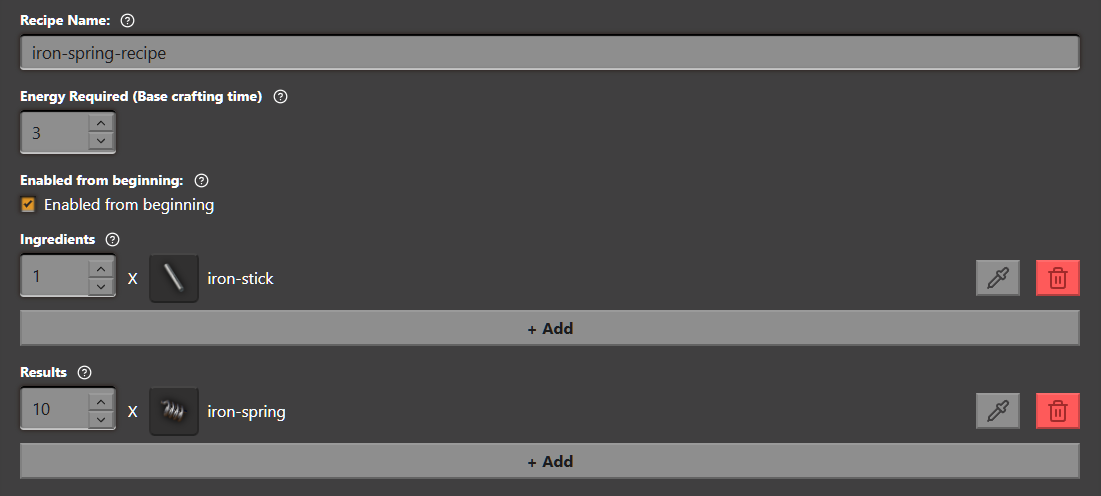
Now fill the form with a name like iron-spring-recipe,
and set Energy Required to 3
Now click on Finish
Adding Ingredients and Results to Recipes
Select the iron-spring-recipe recipe from the Content Panel
and click on the big + Add button in the Ingredients category.
A new entry will now be added.
Change the item by clicking the pipette button or by clicking on the icon.
Select the iron-stick (Its called iron rod ingame) from intermediate-products.
Click on Choose iron-stick.
Repeat the same for the Results category,
but choose our iron-spring item from the Mod Added tab
Don't forget to save! ( Ctrl + S )
Heres the finished recipe:
Whats next?
In the next guide we will cover how to build and test your mod